// overview
A complete appointment booking agent built on Make.com. Instead of manually checking a calendar and replying to every booking request by hand, this agent handles the entire flow the moment someone submits the Tally form.
The agent checks the requested date and time against existing Google Calendar events. If the slot is free, it books the event, logs the confirmed appointment to Google Sheets, and sends a confirmation email automatically. If the slot is already taken, it pulls the conflicting events, hands that context to Google Gemini AI, and lets the AI write a natural response — logging that attempt separately and emailing the user back.
Zero manual scheduling. Zero double-bookings. 24/7.
// system diagram
// proof of work — live scenario
This is the actual Make.com scenario running live. Every module visible here is active and deployed.
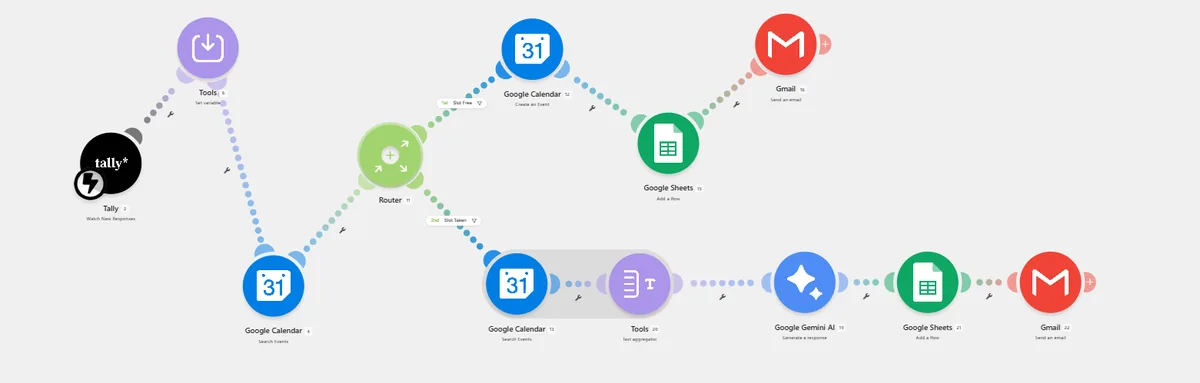
// live scenario — Tally trigger → set variable → Google Calendar search → router → create event / AI conflict path → Google Sheets → Gmail
// screenshots
// step breakdown
| # | Step | Tool | Status |
|---|---|---|---|
| 1 | User submits a booking request through the Tally form — name, email, requested date/time | Tally | ✓ Live |
| 2 | Set Variable normalizes the submitted date/time into a single clean date+time value used by every downstream step |
Make.com — Set Variable | ✓ Live |
| 3 | Google Calendar is queried to check whether the requested slot is already booked | Google Calendar — Search Events | ✓ Live |
| 4 | Router splits the flow based on availability — Slot Free or Slot Taken | Make.com Router | ✓ Live |
| 5a | Slot free: event is created directly on the calendar | Google Calendar — Create Event | ✓ Live |
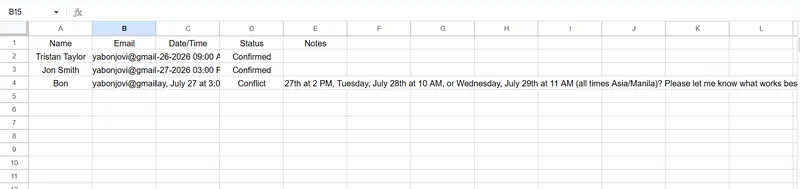
| 6a | Confirmed booking logged to Google Sheets — name, email, formatted date, Status = Confirmed | Google Sheets — Add a Row | ✓ Live |
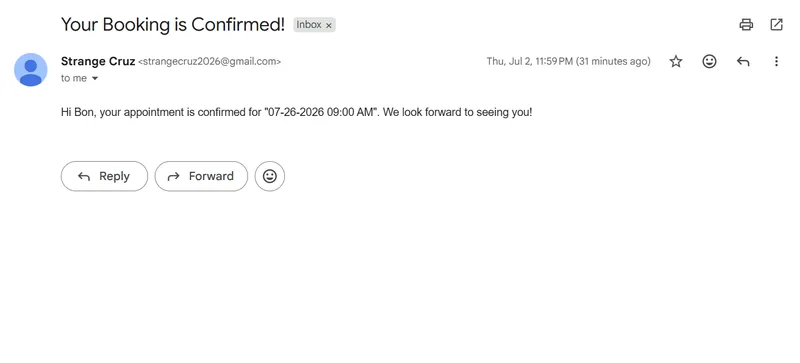
| 7a | Confirmation email sent automatically with a human-readable date | Gmail — Send an Email | ✓ Live |
| 5b | Slot taken: conflicting calendar events for that window are pulled | Google Calendar — Search Events | ✓ Live |
| 6b | Gemini reads the conflicting events directly and generates a natural reply, e.g. proposing alternative times | Google Gemini AI | ✓ Live |
| 7b | Attempt logged separately to Google Sheets with a distinct status | Google Sheets — Add a Row | ✓ Live |
| 8b | Gemini's generated response is emailed back to the user | Gmail — Send an Email | ✓ Live |
// current status
✓ Fully Working
- Real-time availability check against Google Calendar
- Auto-books confirmed slots — no double-bookings
- AI-generated replies when a slot is taken
- Every attempt logged to Google Sheets
- Confirmation and follow-up emails sent automatically
- Zero manual scheduling
✓ Full Pipeline Live
- Tally form trigger — live
- Date/time normalization — live
- Conflict detection and AI reply path — live
- Google Sheets logging on both paths — live
- Gmail notifications on both paths — live
- End-to-end automated
// build story — the date formatting bug
The workflow logic worked on the first pass. What didn't work — for a while — was something much smaller and much more annoying: getting a date to display the same clean way in every place it showed up.
Clean date in Make, raw ISO in Google Sheets
The Set Variable step showed a perfectly readable date — "July 24, 2026 1:00 PM" — in Make's own execution log. But the Google Sheets row it fed into showed a raw ISO timestamp like 2026-07-12T02:00:00.000Z instead.
Column formatting and value input option
The first suspects were Google Sheets column formatting and Make's "value input option" (RAW vs USER_ENTERED). Both were checked and corrected — column set to plain text, input option set to RAW — but the ISO string kept showing up.
The date was never text to begin with
The readable date in Make's log was only a display convenience. Internally, date+time stayed a Date object until something explicitly converted it. Any field it landed in without an explicit format call serialized it back to ISO 8601 — regardless of Sheets settings.
Broken concatenation in the Gmail body
The confirmation email had a second, unrelated-looking symptom — a garbled string like "AM0iam/7amni7/31/2026am" tacked onto the end of an otherwise correct sentence. Tracing it back showed a leftover broken date expression concatenated alongside a working one, left over from earlier edits.
formatDate() applied at every output point
The fix was the same in both places: wrap date+time in Make's formatDate() function wherever it left the pipeline as plain text — once in the Google Sheets mapping, once in the Gmail body — and delete the stray leftover expression. Both the sheet log and the confirmation email now show a clean, consistent date.
// what makes it different
→ Not just a form-to-calendar sync
- Actually checks real calendar availability before booking anything
- Two distinct outcomes, not one — auto-confirm or AI-handled conflict
- Gemini reasons over the actual conflicting events, not a canned message
- Every request is logged, whether it succeeded or hit a conflict
- Confirmation and conflict-reply emails both fully automated
- Built entirely on Make.com's native Google Calendar/Sheets/Gmail modules