// overview
This project is the operations backbone for managing freelance/VA clients from first contact to paid invoice — built as a single Notion workspace with four relational databases (Clients, Projects, Tasks, Invoices) feeding one central Dash Board. Instead of checking each database separately, the dashboard surfaces exactly what matters each day: what's overdue, what's due today, which projects are active, and which invoices are still unpaid.
The dataset models a realistic client pipeline — clients at every stage (Lead → Active → Past), projects at every status (Not Started, In Progress, Done), and tasks spanning overdue, due-today, and upcoming — so every filtered view on the dashboard has real content to prove the logic actually works, not just an empty template.
// live screenshot — dashboard overview
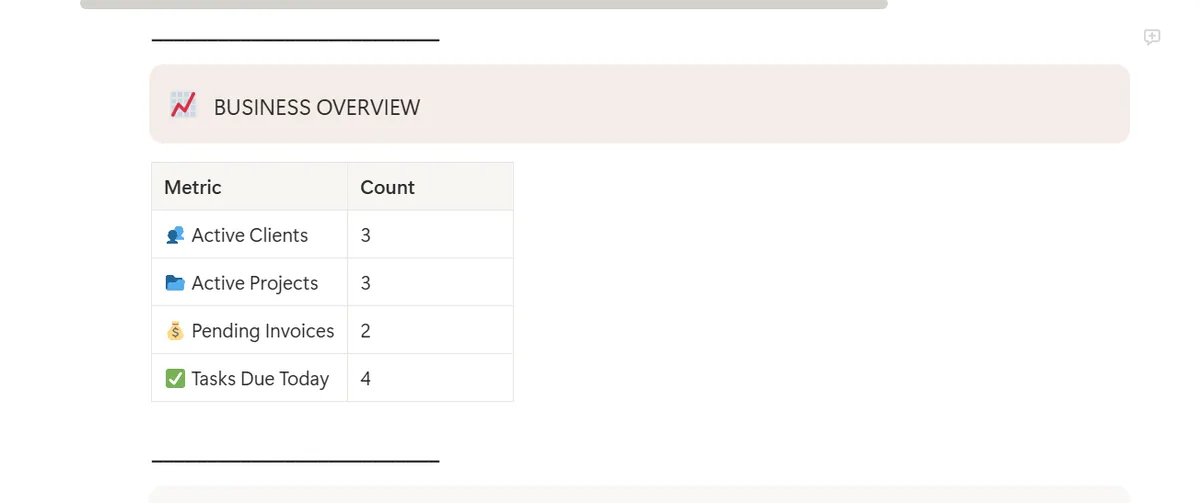
The Dash Board home view — Today's Focus, Overdue Tasks, and the Business Overview metrics table pulling real counts across all four databases.
// Dash Board — Business Overview · Active Clients 3 · Active Projects 3 · Pending Invoices 2 · Tasks Due Today 4
// database architecture
Four databases, connected by relation properties, so every task rolls up to a project, every project rolls up to a client, and every invoice ties directly back to the client being billed. One source of truth per entity — no duplicate data entry across databases.
Every project relates to exactly one client. Every task relates to exactly one project. Every invoice relates to exactly one client. No entity duplicates data another database already owns — relations do the linking.
// live screenshot — relational view
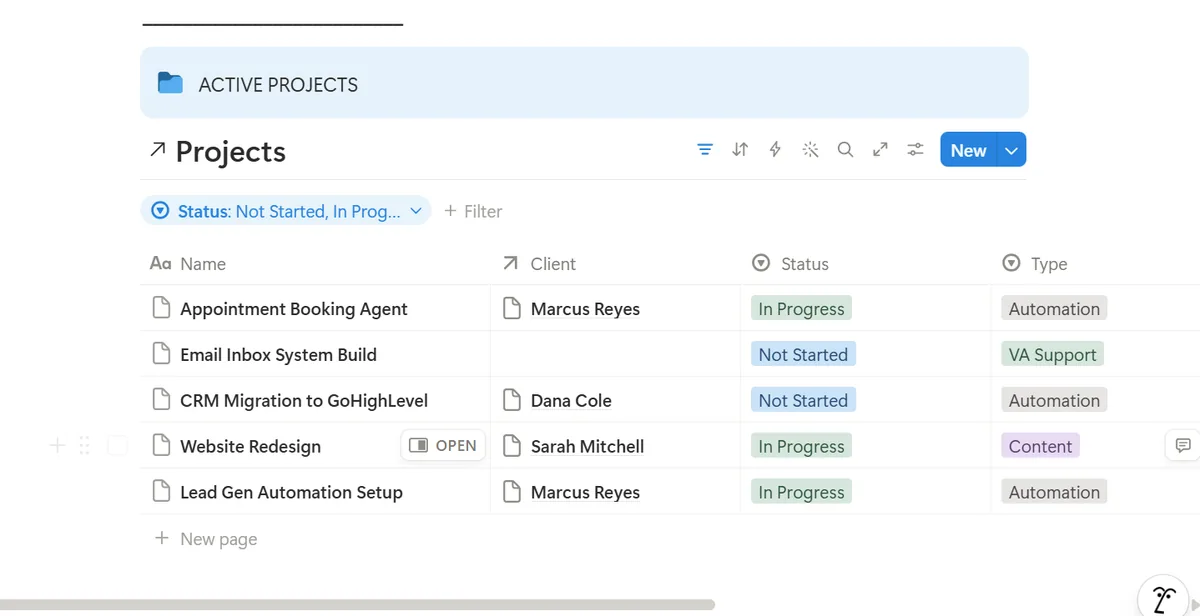
Active Projects, filtered by status, with the Client relation populated — showing the link between the Projects and Clients databases actually resolving.
// Projects database — filtered to Not Started / In Progress · Client column pulled via relation
// build steps completed
| # | Step | Skill | Result |
|---|---|---|---|
| 1 | Designed relational schema across Clients, Projects, Tasks, and Invoices | Notion Relations | ✓ Passed |
| 2 | Populated a realistic dataset spanning the full client lifecycle (Lead → Active → Past) | Data Modeling | ✓ Passed |
| 3 | Built filtered linked views — Overdue Tasks, Today's Tasks, Active Projects, Active Clients, Pending Invoices | Filtered Views | ✓ Passed |
| 4 | Built a Business Overview summary reflecting live counts across all four databases | Dashboard Design | ✓ Passed |
| 5 | QA pass caught a data entry mismatch on an invoice amount before publishing — corrected against source records | QA / Review | ✓ Passed |
// relation map
How the four databases connect, and what each relation is responsible for surfacing on the dashboard.
| Database | Relation Field | Links To | Purpose |
|---|---|---|---|
| Projects | Client | Clients | Ties each project to its owning client |
| Tasks | Project | Projects | Ties each task to its parent project |
| Invoices | Client | Clients | Ties billing directly to the client record |
| Dash Board | Filtered Views | All 4 databases | Surfaces overdue, today's, active, and pending items in one place |
// skills demonstrated
Database Design
- Relational schema across 4 DBs
- Status property design
- Consistent select/status options
- Priority & due-date fields
- One source of truth per entity
- Scalable, reusable structure
Dashboard & Views
- Filtered views per use case
- Due-date filtering logic
- Status-based filtering
- Linked view embedding
- Business overview metrics
- Clean sidebar navigation
Client Operations
- Full lifecycle tracking
- Task prioritization
- Invoice status tracking
- Onboarding-ready structure
- Cross-database navigation
- Realistic pipeline data
// key strategies
Database Design Rules
- Every project relates to one client
- Every task relates to one project
- Every invoice relates to one client
- Status options stay consistent across DBs
- Relations before rollups
- No entity duplicates another's data
Dashboard Habits
- Filter "Past Day" for Overdue Tasks
- Filter "This Day" for Today's Focus
- Static counts for a clean, screenshot-ready view
- Verify numbers against source before publishing
- Color-coded status tags for scannability
- Minimal sidebar — 4 databases only
// impact
Most solo VAs and small agencies run their client pipeline across scattered spreadsheets, sticky notes, or memory — no single view of what's overdue, who's paid, or which projects are stalled. That gap is exactly where clients get dropped and invoices get missed.
This system gives a one-person operation the same visibility a small team's project manager would have: every overdue task flagged automatically, every client's stage tracked from first contact to final invoice, and one dashboard that answers "what needs my attention today" without opening four separate databases.
The pattern — clients → projects → tasks → invoices, all relation-linked into one dashboard — isn't specific to any one niche. It's the same backbone that scales from a solo VA's first three clients to a small agency's full roster.