● system status: available for new workflows

Project

Automation · trello · no-code

Trello Client Onboarding Automation

A fully automated client pipeline built inside Trello — moving cards across 7 stages, swapping checklists per stage, auto-assigning due dates, flagging urgent work, and sending email alerts — all triggered by zero manual input after the initial setup.

← back to projects
Live on Trello — Client Onboarding Tracker
Type: No-Code Automation Tools: Trello Butler · Gmail Rules: 8+ Pipeline Stages: 7 Status: Live

// overview

This is not a simple Trello board. It is a fully automated client onboarding pipeline where every stage transition is handled by Trello's Butler automation — no manual checklist swapping, no forgetting to update due dates, no missed follow-ups.

When a new client card is created, the automation fires immediately — setting a due date, description, checklist, and email notification in one rule. As the client progresses through each stage, the checklist swaps automatically, the label updates, a comment is logged with the date, and the due date resets for the next stage.

Built entirely with Trello's free Butler automation — no external tools, no paid plans, no code required.

// pipeline stages

Lead
→
Proposal Sent
→
Contract Signed
→
Onboarding
→
Active
→
Offboarding
→
Completed

Each stage has its own checklist template, label color, due date window, and audit comment — all applied automatically on card entry.

// proof of work — live screenshots

These are actual screenshots from the live board. Click any image to enlarge.
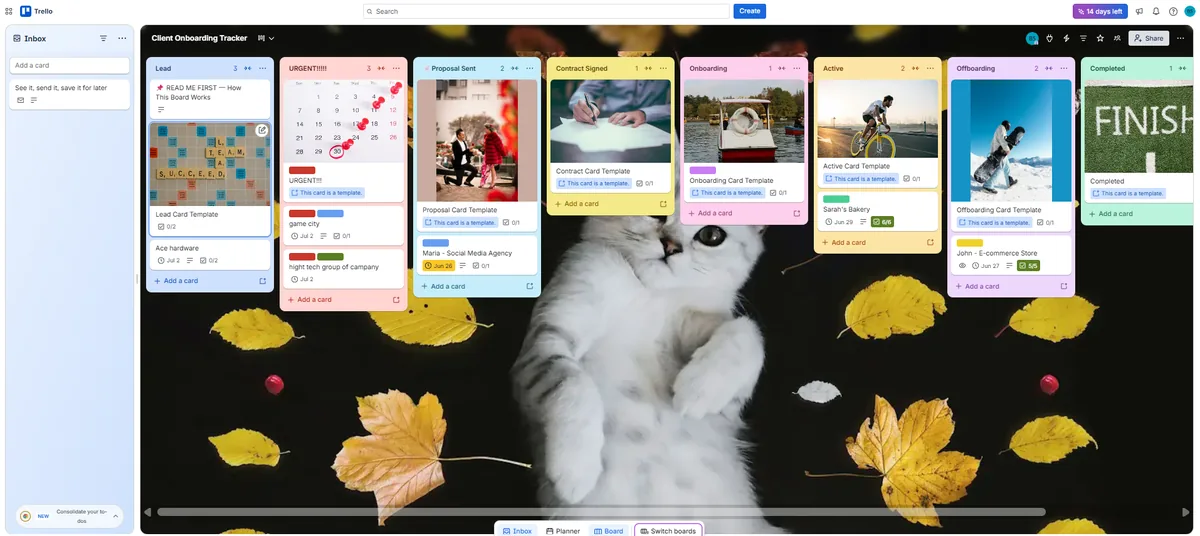
Live Trello board showing all 7 pipeline stages with real client cards
// live board — 7-stage pipeline with real client cards, template cards, color labels, and due dates visible
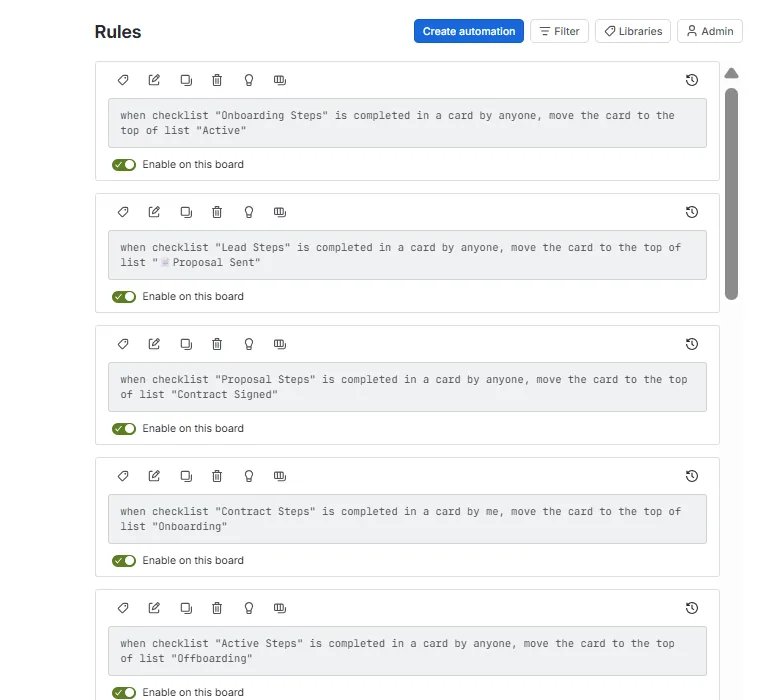
Butler rules showing checklist completion triggers for each stage transition
// butler rules (1 of 2) — checklist completion → stage transitions
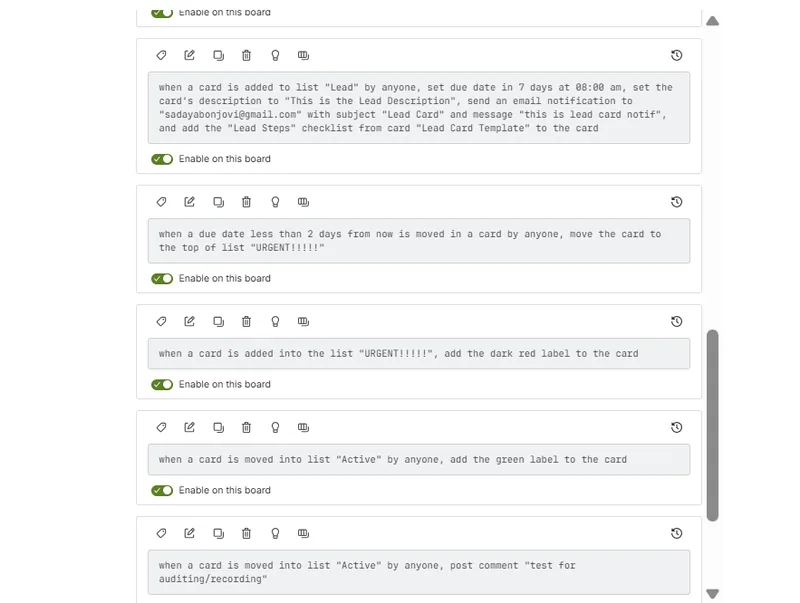
Butler rules showing new lead setup, urgent flag, label assignment, and audit comment rules
// butler rules (2 of 2) — new lead setup, urgent flag, label + audit comment

// system diagram

TRIGGER 1. New card added to Lead list AUTO SETUP 2. Set due date · description · email TEMPLATE Card Template per list CHECKLIST 3. Add "Lead Steps" from template IN PROGRESS 4. Team completes checklist items URGENT FLAG Due < 2 days → URGENT list STAGE TRANSITION 5. Checklist complete → move card AUTO ACTIONS 6. Butler automation fires CHECKLIST Swap checklist LABEL Set stage color COMMENT Log date + stage DUE DATE Reset X days A B C D LEGEND Automated step Side effect / parallel trigger Automation pipeline path Manual action

// automation rules

Rule 01 — New Lead
When a card is added to list "Lead" → set due date 7 days · set description · send email notification to sadayabonjovi@gmail.com · add "Lead Steps" checklist from template
Rule 02 — Urgent Flag
When due date is less than 2 days from now → move card to top of "URGENT!!!!!" list
Rule 03 — Urgent Label
When a card is added to list "URGENT!!!!!" → add dark red label to the card
Rule 04 — Stage Transition (checklist-driven)
When checklist [X Steps] is completed → move card to top of list [Next Stage] · covers Lead → Proposal Sent → Contract Signed → Onboarding → Active → Offboarding
Rule 05 — Label on Stage Entry
When a card is moved into list "Active" → add green label · pattern repeated per stage with stage-specific label colors
Rule 06 — Audit Comment
When a card is moved into a list → post comment "[stage name] — [date]" for audit trail and visibility
Rule 07 — Due Date Reminder
When due date is 1 day from now → send email to owner with subject "ALERT!!!!" and message "DUE DATE IS NEAR"
Rule 08 — Pipeline Complete
When checklist "Offboarding Steps" is completed → move card to top of "Completed" list

// step breakdown

# Step Tool Status
1New card created → due date, description, email, checklist auto-appliedTrello Butler✓ Live
2Card approaching due date → auto-flagged and moved to URGENT listTrello Butler✓ Live
3URGENT card gets dark red label applied automaticallyTrello Butler✓ Live
4Checklist completed → card moves to next pipeline stageTrello Butler✓ Live
5On stage entry → old checklist removed, new stage checklist added from templateTrello Butler✓ Live
6Label color updates per stage — visual pipeline progress at a glanceTrello Butler✓ Live
7Audit comment posted with stage name and date on every transitionTrello Butler✓ Live
8Due date resets automatically for each stage windowTrello Butler✓ Live
9Email alert sent 1 day before due date — works across all listsButler + Gmail✓ Live
10Offboarding checklist complete → card auto-moved to CompletedTrello Butler✓ Live

// current status

✓ Fully Working

  • 7-stage automated pipeline
  • Auto checklist swap per stage
  • Auto due dates on card entry
  • Urgent flagging system
  • Label colors per stage
  • Audit trail via auto comments
  • Due date email reminders
  • Full pipeline to Completed

→ What Makes It Different

  • Zero manual checklist work
  • Template cards per list
  • Works on free Trello plan
  • No external tools needed
  • Built and configured solo
  • Fully no-code setup

// full vision

This automation pattern can be adapted for any service-based business that manages clients through multiple stages — agencies, freelancers, consultants, or internal ops teams.

The same structure — template cards + Butler rules + stage-based triggers — can be extended with Make.com or Zapier for deeper integrations like CRM sync, Slack notifications, invoice generation, or Google Sheets reporting dashboards.

// tools used

Trello Butler Automation Trello Card Templates Gmail (email notifications) Trello Calendar Power-Up No-Code / Free Plan