// overview
Overview
This project demonstrates a complete Gmail inbox management system built for a real client delegation scenario. Using Gmail's native tools — labels, filters, stars, templates, and delegated access — the inbox was transformed from unorganized emails into a clean, prioritized, and fully actionable workspace. No third-party tools required.
The system was built to be handed off — meaning the client never needs to share their password, explain their inbox, or manage email manually again.
Label Architecture
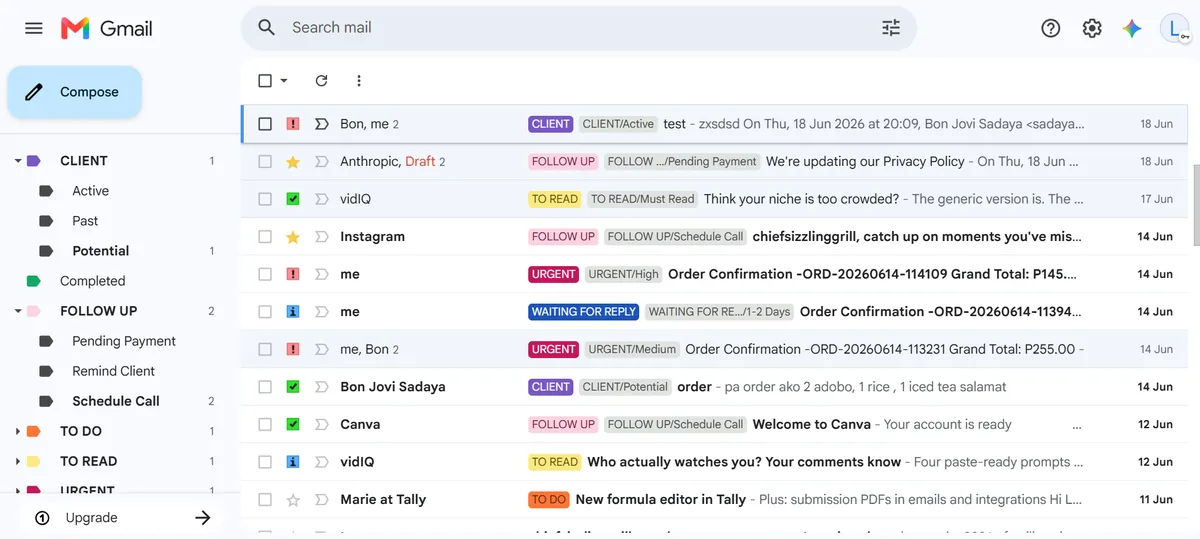
Every email is categorized the moment it's identified. The label structure uses parent labels for broad categories and sub-labels for specific context — so nothing is ever just "somewhere in the inbox."
- CLIENT — Active / Past / Potential
- FOLLOW UP — Pending Payment / Remind Client / Schedule Call
- URGENT — High / Medium
- TO DO — actionable tasks needing a response or action
- TO READ — Can Skip / Must Read / Reference
- WAITING FOR REPLY — 1–2 Days / longer timelines
- COMPLETED — finished and archived, still searchable
Each label is color-coded for instant visual scanning — no reading required to know what an email needs.
Star Priority System
Stars add a second layer of visibility on top of labels — a quick glance at the inbox shows not just what category an email belongs to, but exactly what action it needs right now.
- ⭐ Yellow star — needs attention / reply
- 🔴 Red bang — urgent, act immediately
- ✅ Green check — done, ready to archive
- 🔵 Blue info — waiting for reply, monitoring
Inbox Section Layout
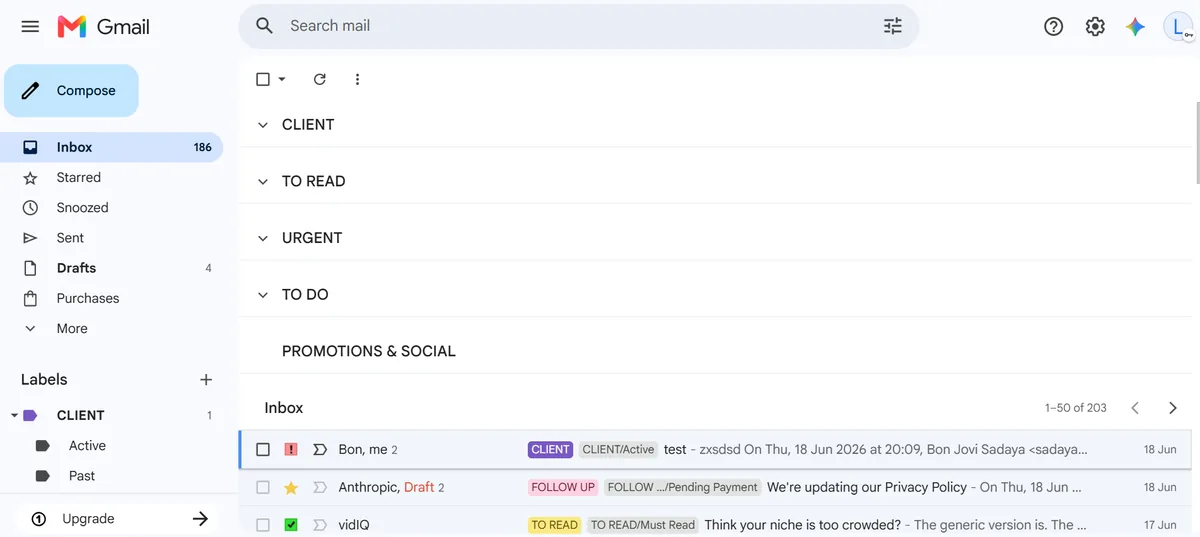
The inbox is split into labeled sections so high-priority emails are never buried under newsletters or promotions. Each section surfaces only what matters for that category — client emails at the top, everything else below.
- CLIENT — active client emails always visible first
- TO READ — content and updates, reviewed on schedule
- URGENT — anything needing immediate action
- TO DO — tasks queued and tracked
- PROMOTIONS & SOCIAL — lowest priority, reviewed last
Filters & Response Templates
Incoming emails are automatically sorted using Gmail filters — no manual labeling needed for recurring senders. Combined with canned response templates, common replies go out in seconds instead of minutes.
- Auto-filters — label and categorize emails by sender or keyword on arrival
- Acknowledgement Reply — instant response confirming receipt within 24 hours
- Follow Up — polite check-in after no response
- Schedule Call — booking template with open time slots
- Payment Reminder — professional nudge with payment details
- Task Completed — clean summary of what was done and what's next
Delegated Access Setup
The entire system is managed through Gmail's delegated access feature — meaning the VA can read, organize, label, and respond to emails on the client's behalf without ever knowing the client's password. The client stays in full control of their account at all times.
- Client grants access via Settings → Accounts → Grant access
- VA logs in through their own Google account
- All sent emails show the client's address — seamless to recipients
- Access can be revoked instantly by the client at any time
Daily Management Flow
The system follows a consistent daily workflow so the inbox never falls behind and the client always has a clear picture of what's pending.
- Open inbox → scan URGENT and CLIENT sections first
- Apply labels and stars to any new unlabeled emails
- Reply to priority emails using templates where applicable
- Snooze non-urgent emails to the appropriate follow-up date
- Schedule outgoing emails for optimal send times
- Move completed items to COMPLETED label and archive
- End of day — inbox is at zero unprocessed emails
Tools Used
- Gmail Labels & Sub-labels — category architecture
- Gmail Filters — auto-sort on arrival
- Gmail Stars — priority flagging system
- Gmail Templates — canned responses for common replies
- Schedule Send — timed outgoing emails
- Snooze — deferred inbox management
- Delegated Access — secure client handoff
- Multiple Inboxes — sectioned inbox layout
- Gmail Signature — professional sign-off on all outgoing mail
Live System Screenshots
Actual screenshots of the Gmail inbox management system in action — showing the label architecture, color-coded priority system, and sectioned inbox layout as a working, real setup.
// inbox sections — CLIENT · TO READ · URGENT · TO DO visible at a glance
// full label system — color-coded tags with sub-labels and star priority