// overview
A complete AI Lead Qualification Agent deployed on Facebook Messenger — where most people already are. Instead of waiting for someone to visit a website, this agent meets them on the platform they use every day and handles the entire qualification flow automatically.
The agent is trained on Bon's full background — his 7 years in the Philippine Coast Guard, his Top 1 of 55 ranking, his transition into VA and automation work, his projects, his personality, and his availability. It speaks as Bon, not as a generic assistant.
When someone messages the Automate with Bon Facebook page, the agent responds instantly — answering questions about services, background, and availability — and naturally collects name, project details, and email when hiring interest is detected. All lead data is automatically logged to Google Sheets and a follow-up notification is sent via Gmail. Zero manual work. 24/7.
// system diagram
// proof of work — live scenario
This is the actual Make.com scenario running live. Every module visible here is active and deployed.
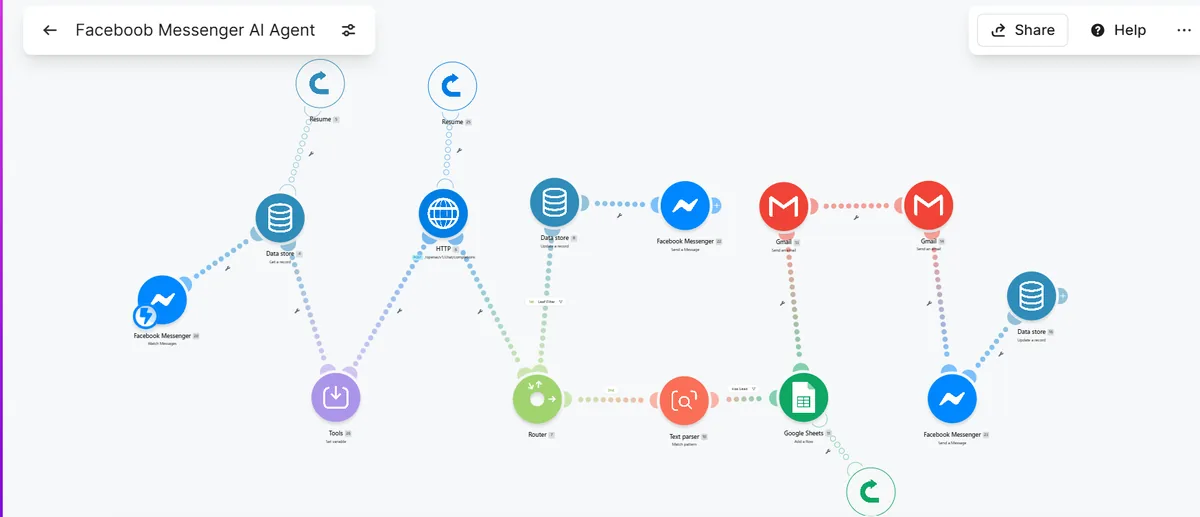
// live scenario — webhook → data store → set variable → HTTP (Groq AI) → router → text parser → Google Sheets → Gmail · error handlers on all critical paths
// step breakdown
| # | Step | Tool | Status |
|---|---|---|---|
| 1 | User sends a message to the Automate with Bon Facebook Page | Facebook Messenger | ✓ Live |
| 2 | Meta Messenger API fires a webhook event to Make.com | Meta Messenger API | ✓ Live |
| 3 | Make.com Watch Messages module receives the message and sender ID | Make.com | ✓ Live |
| 3.5 | Conversation history retrieved from Data Store per user — injected into prompt for full context across messages | Make.com Data Store | ✓ Live |
| 4 | Input sanitization — user message and history normalized into clean variables before touching the AI prompt. Prevents JSON breaks from special characters, quotes, and unexpected formatting | Make.com Tools — Set Variable | ✓ Live |
| 5 | HTTP module sends sanitized message to Groq AI with full Bon profile as system prompt and clean conversation history | Groq AI (llama-3.3-70b) | ✓ Live |
| 6 | Make.com Send Message module replies to the user on Messenger automatically. Data Store updated with new exchange | Make.com + Meta API | ✓ Live |
| 7 | Router splits path — normal conversation continues, lead detection triggers separate pipeline | Make.com Router | ✓ Live |
| 8 | Lead detection — when hiring interest is shown, AI collects name, project, and email naturally one at a time. Each lead logged exactly once regardless of messages that follow | Groq AI + System Prompt | ✓ Live |
| 9 | Text parser extracts lead data via regex — name, email, project parsed from AI output and structured for logging | Make.com Text Parser | ✓ Live |
| 10 | Lead logged to Google Sheets with timestamp, name, email, project, and source. Duplicate logging prevented by router logic | Make.com + Google Sheets | ✓ Live |
| 11 | Automated Gmail notification sent to owner. Follow-up email sent to lead. Error handlers on all critical paths — scenario never breaks silently | Make.com + Gmail | ✓ Live |
// current status
✓ Fully Working
- Receives all Messenger messages
- AI responds as Bon — 24/7
- Knows Bon's full background
- Handles any question naturally
- Instant automated replies
- Conversation memory per user
- Input sanitization before every AI call
- Error handlers on all critical paths
- Zero manual work
✓ Full Pipeline Live
- Meta App Review approved
- Publicly accessible to all users
- Lead qualification — live
- Google Sheets logging — live
- Gmail notifications — live
- Text parser extracts lead data
- Duplicate logging prevented
- End-to-end automated
// what makes it different
→ Not a generic chatbot
- Trained on Bon's real background — Coast Guard, projects, certifications
- Speaks in first person as Bon — warm, genuine, and natural
- Knows his exact services, availability, and personality
- Remembers conversation history per user via Data Store
- Qualifies leads naturally — no forms, no friction
- Full pipeline: chat → qualify → log → notify, all automated
- Built on free tools — Make.com + Groq AI free tier
- Same architecture can be deployed for any business page
// build story
This project didn't start as an AI lead agent. It started as a simple goal: give a Messenger chatbot memory. What it became — and how it got there — is the real story.
Just add memory to a chatbot
The goal was straightforward — connect a Messenger bot to Make.com's Data Store so it could remember what users said across messages. No lead gen. No email alerts. Just memory.
Memory became a full AI agent
Once the memory layer worked, the next logical step was clear: if the bot remembers users, it can qualify them. Lead detection was added via system prompt tagging, then a router to catch qualified leads, then Google Sheets logging, then Gmail alerts. What started as one feature became an 11-step automated pipeline.
Make.com free trial ran out mid-build
With the pipeline nearly complete, the Make.com free trial hit its operation limit. The scenario stopped running. Rather than abandon the build, a new Make.com account was created and the entire pipeline was rebuilt from scratch — routing logic, Data Store, webhook verification, OAuth scopes, and all.
Duplicate lead logging fixed
After going live, a logic error surfaced — the pipeline was logging the same lead on every message after the initial capture, not just once. The system prompt tagging and router logic were corrected so each lead is logged exactly once, regardless of how many messages follow.
Fully live — rebuilt, debugged, deployed
The agent passed Meta App Review and went fully public. It now runs 24/7 on the Automate with Bon Facebook Page — responding as Bon, qualifying leads, logging to Sheets, and sending Gmail alerts. Built twice, debugged live, shipped clean.
// qa case study — the json escaping bug
Shipping the pipeline wasn't the end of the story. A structured QA pass after launch surfaced a bug that only showed up after several conversational turns — the kind of issue that's invisible in a quick demo but breaks things in real usage.
⚠ The Bug
- Conversation history began producing malformed JSON after a few exchanges
- New incoming messages were sanitized correctly before hitting the AI
- Stored conversation history was NOT sanitized before being re-injected into the prompt
- Unescaped characters from earlier turns silently accumulated in storage
- Payload eventually broke — but only after a few turns, not on message one
→ Root Cause
- The escaping fix was applied to the new message only
- It was never applied to history pulled from Data Store on each turn
- Bug was timing-dependent — required accumulated unescaped content to surface
✓ The Fix
- Used Make.com's built-in
escapeJSON()function - Added a dedicated Set Variable step —
clean_history - Applies escapeJSON() to stored history before reassembly into the prompt
- Matches the sanitization already applied to new messages
- Fixed at the source, not patched downstream
Verification — structured test pass against the live agent:
| # | Test Case | Result |
|---|---|---|
| 1 | Special characters and symbols (!@#$%^&*()_+=;:"'><?/.,) | ✓ Pass |
| 2 | Emoji input | ✓ Pass |
| 3 | Unicode and multi-language text (中文, é, etc.) | ✓ Pass |
| 4 | File paths and backslashes (C:\Users\test\file.txt) | ✓ Pass |
| 5 | Raw JSON-formatted text (checking it isn't misread as structural data) | ✓ Pass |
| 6 | Mixed and nested quotation marks | ✓ Pass |
| 7 | Multi-line messages with literal line breaks | ✓ Pass |
| 8 | Markdown-style formatting characters | ✓ Pass |
| 9 | Long-form messages (500+ characters) | ✓ Pass |
| 10 | Reserved internal keyword (trigger behavior check) | ✓ Pass |
→ Why It Matters
- The bug was invisible in a quick demo — it only surfaced after multiple turns
- Root-caused instead of suppressed — the fix targets where bad data entered, not where it broke
- Distinguishes a system that "looks like it works" from one that's production-reliable
// try it
⚡ Talk to the agent — live now
Message the Automate with Bon Facebook Page directly and the AI will respond automatically. Ask about services, background, availability, or anything else. No signup. No waiting. Just message.
// tip: try asking "what services do you offer?" or "I want to hire you"
→ Message Automate with Bon on Facebook